The Claude Desktop App Governance Playbook
The Claude Desktop App quietly became one of the most consequential agentic surfaces in the enterprise. This is the playbook for governing it at scale without slowing the business down.
For most of 2025, Claude Desktop was a chat app. A native window on the laptop that talked to api.anthropic.com, faster than the browser tab, with no real difference in capability. Security teams that worried about Claude worried about Claude Code, the CLI tool that ran shell commands and touched source code. The desktop app sat in the same risk bucket as claude.ai: data leakage through prompts, manageable through a DLP-style policy and a quarterly conversation with legal.
That bucket no longer fits.
The Claude Desktop App in 2026 hosts three distinct operating modes inside a single binary. It is a chat client, an agentic execution platform for non-developers (Cowork), and a launch surface for Claude Code in environments where developers prefer a graphical control plane. It supports MCP. It can read and write files. It can connect to a CRM, fire off a sequence of authenticated API calls, and produce an artifact that lands on disk before a security tool sees a single network event worth flagging.
The risk surface that used to be confined to developers and Claude Code now lives on every laptop where someone uses Claude. That includes marketing, sales operations, finance, HR, customer success, and executive assistants. Tools built to monitor humans reading SaaS dashboards are not designed to govern a knowledge worker who just told their desktop assistant to "pull every closed-won deal from HubSpot, segment by ICP, and draft case study briefs."
This post is the playbook for governing that surface.
We covered the broader four-surface model in Governing Claude Across Web, Desktop, and Code. This one drills into the desktop app specifically: what it now does, where the controls go, and how to implement them in a phased rollout that does not slow the business down.
What Claude Desktop Actually Is in 2026
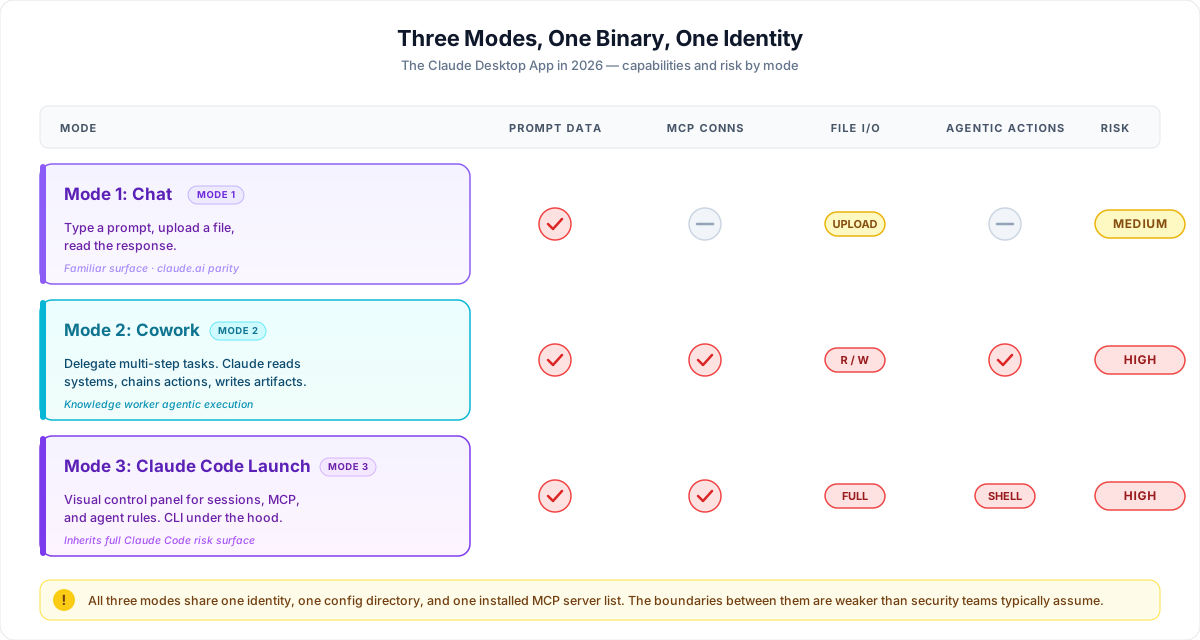
Three operating modes sit inside the Claude Desktop App. They share an interface, but their security profiles are not the same.
Mode 1: Chat
The familiar surface. A user types a prompt, optionally uploads a file, and reads the response. Data flows to Anthropic's API. The risk is data leakage through user input, no different in shape from claude.ai. Most existing DLP-style policies cover the visible parts of this mode, which is also the part that gets the least new attention.
Mode 2: Cowork
The agentic mode for non-developers. A user delegates a multi-step task ("review last quarter's pipeline, find at-risk deals, draft a memo for sales leadership") and Claude orchestrates the work. Cowork connects to enterprise tools through integrations and MCP. It reads from connected systems, produces artifacts, and chains actions across applications. It runs in a constrained execution environment, but the data it touches is real and the actions it takes against connected systems are real.
This is the surface that has changed the risk profile most. The user is not a developer. They have not been trained on credential hygiene, prompt injection, or the consequences of broad MCP scopes. They are a marketing operations lead who wants their work done.
Mode 3: Claude Code Launch Surface
For organizations standardizing on Claude Code, the desktop app can act as a control panel. Sessions, MCP configurations, and agent rules are managed visually. The underlying CLI is still doing the work, so the file system access, shell command execution, and MCP connection risks documented in our earlier Claude Code coverage apply unchanged.
The complication is that all three modes share an identity, a config directory, and an installed MCP server list. An MCP server added by a developer for Claude Code may become reachable by Cowork. A connection installed by an executive assistant may become available to a developer's Claude Code session. The boundaries between these modes are weaker than security teams typically assume.
The Risk Surface Expansion
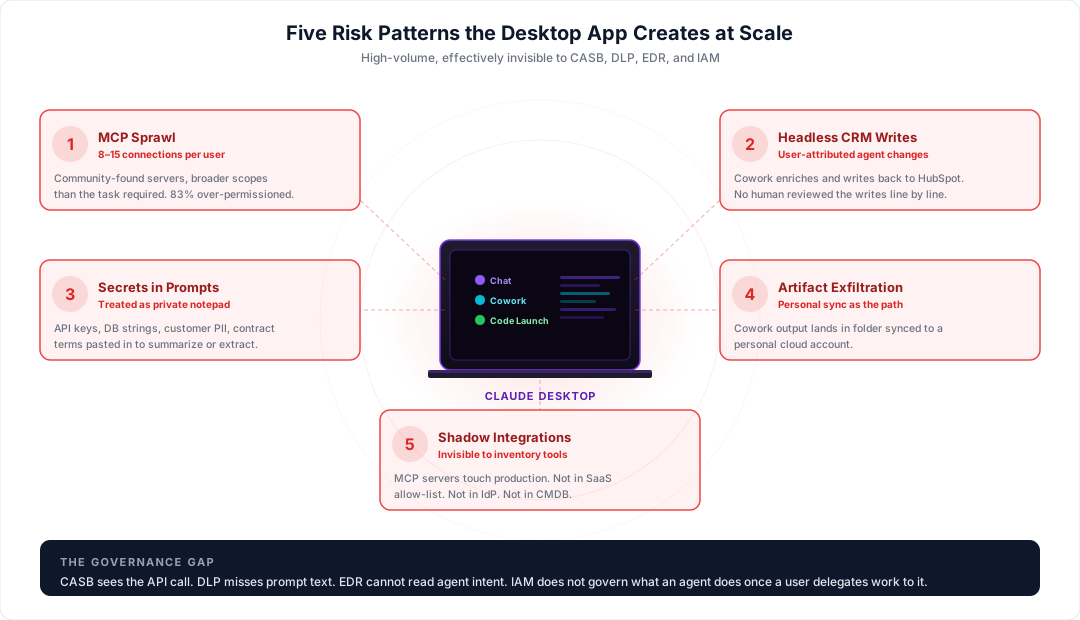
Five concrete risk patterns appear when the desktop app is deployed broadly without governance.
Knowledge worker MCP sprawl. A user installs an MCP server they found in a community directory or a vendor's marketing site. The server now has whatever scopes the user granted, often more than the task required. Unbound scan data on developer environments shows 8 to 15 MCP connections per user with 83% over-permissioned. The same pattern is now appearing in knowledge worker environments, with the added wrinkle that the user has less context for evaluating what a connection actually does.
Headless CRM writes. A sales operations user asks Cowork to "clean up the lead records from last week's webinar." Claude reads from HubSpot, enriches, deduplicates, and writes back. No human reviewed the writes line by line. If the prompt or the data contained an injection or the model reasoned poorly about a duplicate match, the audit trail in the CRM does not capture intent. It captures a user-attributed change made by an agent.
Secrets and credentials in prompts. Knowledge workers paste internal documents into the chat interface to summarize or extract information. Those documents often contain API keys, database connection strings, internal URLs, customer PII, and unredacted contract terms. The desktop app is treated mentally as a private notepad. It is not one.
Data exfiltration through Cowork artifacts. Cowork can output files. Those files can land in synced cloud folders. A user who asks Cowork to "build a competitive intel deck on our top three competitors" may end up with a deck that contains data pulled from internal MCP-connected systems, saved to a folder synced with a personal account. The exfiltration path is the user's own sync client.
Shadow integrations. Users connect MCP servers that touch production systems without IT approval. The integrations are listed in a config file on the user's machine. They do not show up in the SaaS allow-list. They do not appear in the IdP. They are invisible to the standard inventory tools.
Why Existing Tools Miss This
The desktop app is doing things existing tools were not designed to govern.
CASB sees the connection to api.anthropic.com. It does not see the MCP connection to an internal CRM, because that connection is local, between the desktop app process and a locally running MCP server that then talks to the CRM API. The traffic looks normal from a CASB perspective.
DLP watches files moving through email, cloud storage, and known exfiltration paths. Data flowing through a prompt or a Cowork-orchestrated action is not a file event. A 4,000-word excerpt of customer support transcripts pasted into a chat window does not show up as a data transfer.
EDR sees processes and network calls. It cannot distinguish a benign Cowork session from one that is, at that exact moment, exporting every contact from Salesforce to an artifact bound for an unsynced folder.
IAM and PAM govern access to applications and elevated systems. They do not govern what an agent does once a user delegates work to it. The agent is acting under the user's authenticated session, with the user's permissions.
The result is a category of activity that is both high-volume and effectively invisible. That is the governance gap the desktop app has opened.
The Governance Playbook
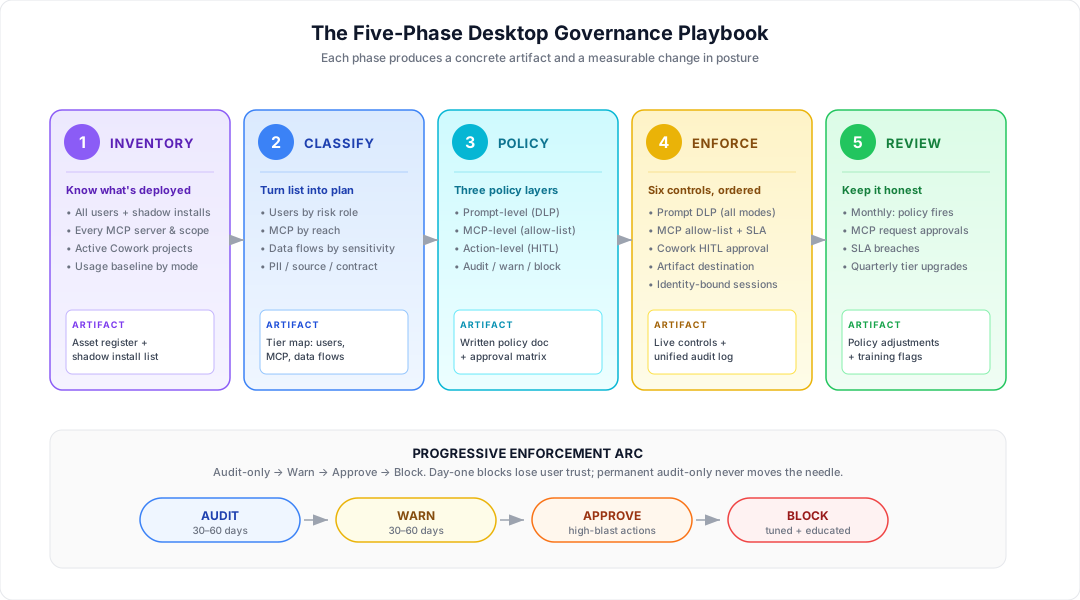
The playbook below is the sequence we recommend for any organization with 100 or more Claude Desktop users. It is structured as five phases. Each phase produces a concrete artifact and a measurable change in posture.
Phase 1: Inventory
The first step is knowing what is actually deployed.
The artifacts to produce:
- A list of every user with Claude Desktop installed, including unsanctioned personal-account installs
- A list of every MCP server configured across those installs, with scopes and the systems each server reaches
- A list of every Cowork project currently active, with the connected tools and data sources for each
- A baseline of usage volume by user and by mode (chat, Cowork, Code-launch)
Most organizations discover three things in this phase: more users than they expected, MCP connections to systems they did not know were exposed, and shadow installs tied to personal Anthropic accounts.
Phase 2: Classification
Inventory without classification is a list, not a control plan. Classification turns the list into one.
Classify users by risk role. A marketing analyst working with public data is not the same risk as a finance lead with Cowork access to the ERP. Three tiers usually work: standard knowledge worker, sensitive-data knowledge worker, and developer or admin.
Classify MCP servers by reach. A server that wraps a public API is different from one that holds production database credentials. Tag each one as sandbox, internal, or production-adjacent.
Classify data flows by sensitivity. Prompts and Cowork actions that touch customer PII, financial records, source code, credentials, or contract terms need stricter controls than those that touch public marketing content.
Phase 3: Policy Framework
Three categories of policy cover the desktop app: prompt-level, MCP-level, and action-level.
Prompt-level policy controls what data can be sent to Anthropic's API through any mode. This is where DLP-style detection lives: secrets, credentials, PII patterns, classified document markers, contract clauses. The policy should support audit, warn, or block at the field level.
MCP-level policy controls which servers users can connect, what scopes those servers can request, and which systems they can reach. The default for a standard knowledge worker should be an allow-list of approved servers with least-scope permissions. A user who wants to add a new MCP server submits a request. The request triggers a security review. The server is added to the allow-list with documented scopes.
Action-level policy controls what an agent can do once it is operating. This is where Cowork governance lives. A Cowork task that writes to a CRM, sends an email, modifies a financial record, or produces an artifact containing sensitive data should hit a defined approval path. Some actions are auto-approved. Some warn the user before proceeding. Some require human-in-the-loop confirmation. Some are blocked.
Phase 4: Enforcement Controls
The specific controls to implement, in order of priority:
-
Prompt DLP across all three modes. Inspect every outbound prompt for secrets, PII, source code patterns, and classified content. Default to warn for the first 30 days, then move to block on the highest-confidence patterns.
-
MCP allow-list. Define the approved set of MCP servers per user tier. Block new connections by default. Provide a self-service request workflow with a 24-hour SLA so the policy does not become a productivity drag.
-
Cowork action approval workflow. Require human-in-the-loop confirmation for writes to systems classified as production-adjacent. CRM writes, ERP writes, file system modifications outside sanctioned folders, and outbound emails should all reach an approval surface before they execute.
-
Artifact destination control. Restrict where Cowork can save artifacts. No writes to folders synced with personal cloud accounts. No writes to network shares the user does not have explicit permission to use. Artifacts containing sensitive data get tagged and tracked.
-
Identity-bound sessions. Tie every desktop app session to the corporate identity. Block personal-account use of the app on managed devices. This eliminates the shadow-install path and ensures every action carries an attribution.
-
Unified audit logging. Every prompt, every MCP invocation, every Cowork action, and every artifact written gets logged to a central store with the user, the time, the mode, the data classification, and the policy decision. The log is what makes incident response possible.
Phase 5: Audit and Review
A monthly review process keeps the governance honest.
The review covers: which policies fired, which users hit them, which MCP requests came in, which were approved, which were denied, and which approvals took longer than the SLA. The output is a small set of policy adjustments plus a flag list of users who may need targeted training.
Quarterly, the review expands to category-level questions. Are there entire teams that should move from warn to block on a given policy. Are there MCP servers that should be deprecated. Are there workflows where the approval path is creating enough friction that users are routing around the desktop app entirely.
The Implementation Arc
The progressive enforcement model that works for Claude Code applies to the desktop app as well. Start in audit-only mode for 30 to 60 days. Use that window to baseline what is actually happening. Move to warn for the next 30 to 60 days, with messaging that explains why the prompt or action is being flagged. Move to approve for high-blast-radius actions next. Block only once the team has confidence that the policy is well-tuned and the user population has been educated.
The fastest path to losing knowledge worker trust is a day-one block on a behavior they were already doing routinely. The fastest path to ineffective governance is a permanent audit-only posture. The arc matters.
How Unbound Implements This
Unbound AI is the first Agent Access Security Broker (AASB). It applies a single control plane across Claude Desktop and the rest of the AI agent surface. Specific to the desktop app:
- Continuous inventory of Claude Desktop installs, modes in use, MCP servers configured, and Cowork projects active, across the organization
- Real-time prompt-level DLP across chat, Cowork, and Code-launch modes
- MCP allow-listing with per-tool scope controls and a self-service request workflow
- Action-level policy enforcement for Cowork, including human-in-the-loop approval for CRM writes, file modifications, outbound emails, and other production-adjacent actions
- Artifact destination governance with detection of personal-account sync paths
- Identity binding that blocks personal-account installs on managed devices
- A unified audit trail tied to user identity, mode, MCP server, and policy decision
The same policies cover Claude Code and other AI coding agents (Cursor, Copilot, Cline, Windsurf, Codex). One policy engine. One audit store. One control plane across every surface where an agent is making decisions inside the company.
For the foundational concepts behind this approach, see What is an Agent Access Security Broker (AASB)?. For MCP-specific guidance, see MCP Server Governance.
Take Action
See it in your environment. Request a free risk assessment to scan Claude Desktop usage and MCP exposure across your organization in under five minutes.
Book a demo. Walk through Unbound applying the playbook above to your environment at getunbound.ai/book-demo.
Related reading

Co-Founder & CEO, Unbound AI
Raj is Co-Founder and CEO of Unbound AI (YC S24), building the AI Agent Security Broker (AASB) for enterprises adopting AI coding agents. Previously led DLP and CASB at Palo Alto Networks, and launched RASP and serverless security at Imperva. MIT Sloan alum. Pioneer Fund Venture Partner.
Connect on LinkedInAbout Unbound AI
Unbound AI is a YC-backed (S24) company building the AI Agent Security Broker (AASB), the governance layer enterprises use to safely deploy AI coding agents like Claude Code, Cursor, Copilot, and Codex. Unbound AI raised $4M in seed funding led by Race Capital in 2025, with participation from Y Combinator and other investors. Learn more
Ready to govern your AI coding agents?
Full visibility in under 5 minutes. No code changes. No developer workflow disruption.
Related articles
Prompt Injection in Coding Agents: Every Attack, Every Defense
Top MCP Server Risks in Production: A Red Team Walkthrough